DAVID Documentation: Functional Annotation Table
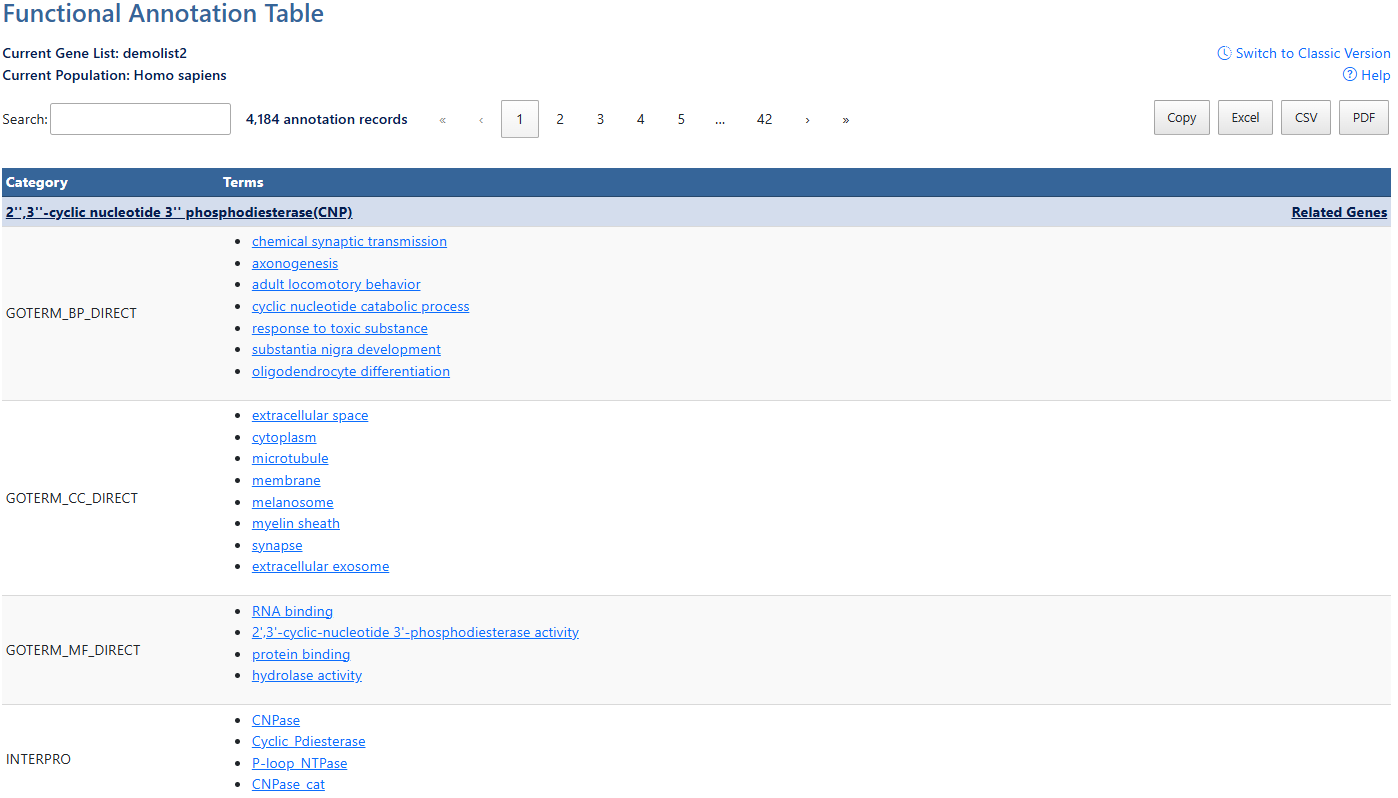
A gene-centric view which lists the genes and their associated annotation terms. There is no statistics applied in this report
x: ---% , y: ---%
-
Current Gene List & PopulationDisplays the active gene list and selected species or background population.
-
Help and Switch to Classic VersionLink to this help page and provides access to the legacy Gene List Report interface.
-
Search and Record CountThe search box filters table results in real time. The record count indicates total annotations found for all genes.
-
PagesClick on numbers to navigate pages of results. Single arrow buttons move forward/back by one page, double arrow buttons mavigate to first/last page.
-
Export OptionsResults can be exported using Copy, Excel, CSV, or PDF. Exports reflect the current filtered and sorted view.
-
CategoriesCategories of term results, indicating orginal source of information. (e.g. UP = uniprot). Click to sort by this value.
-
AnnotationsAnnotations available for each item. If available, hyperlinks lead users to original resources for further details. Click to sort by this value.
-
Gene NameAnnotation results are grouped by each gene. Click the gene name link to explore the full gene report. For more information, see the Gene Report documentation page.
-
Related Genes (RG)Click the RG link to explore functionally related genes associated with each entry. For more information, see the Related Genes documentation page.